 Live Chat
 Contact Us
 Submit Ticket
Email Security with Check Point
To better protect the Liberty University community from evolving email threats, Liberty has implemented Check Point Email Security. This enhanced security solution works quietly in the background to protect your LU email from phishing, unsafe links, and malicious attachments — without changing how you use email. Below you’ll find detailed information and answers to frequently asked questions.
What This Means for You:
You do not need to install anything or change how you use your LU email. Check Point works automatically in the background to help protect you from:
- Phishing and scam emails
- Harmful or unsafe attachments
How Email Protection Works:
Check Point continuously reviews emails sent to and from @liberty.edu addresses, including:
- Incoming external email
- Internal university email
- Outgoing university email
If an email is identified as unsafe, the system may:
- Remove the message from your inbox
- Disable harmful links
- Block unsafe attachments
- Move the spam email to the Junk folder
You may notice that the occasional email has disappeared from your inbox. This is normal and indicates that the system has detected a risk and removed it for your protection, even if you previously received or opened it.
The Quarantine Digest Email:
If Check Point takes action on an email in your mailbox, you will receive a Quarantine Digest at 8 a.m. EST summarizing what was detected and handled. In most cases, you will not need to take any action in response to this email.
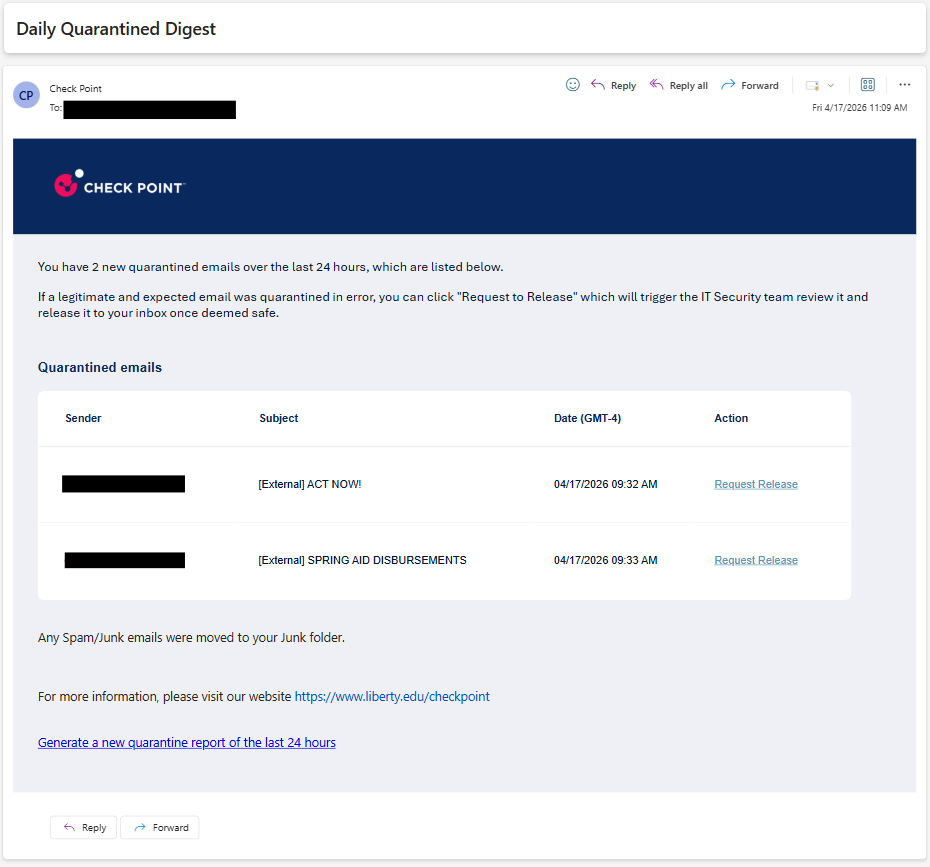
If You Believe a Safe Email Was Quarantined:
If you believe a legitimate email was quarantined in error, click on Request to Release (see above picture). If that button is missing or you have any issues, please contact the IT HelpDesk.
Email Best Practices:
Your existing email habits already play an important role in keeping our organization secure. Check Point adds an extra layer of protection — be sure to remember these best practices as you go about your day:
- Be cautious with unexpected messages
- Do not click on unfamiliar links or open unexpected attachments
- Follow university guidelines when reporting suspicious emails