Search Engine Optimization (SEO) Basics
What is SEO?
SEO stands for Search Engine Optimization, and it is a way of making your web content easier to find. If you apply these SEO basics to your web pages, you’ll instantly be easier to find. Let’s start with keywords, an important piece of SEO.
Understanding Keywords
To make your web page more findable, it’s important to understand how and where to use keywords. A keyword is simply a word or phrase that describes your website, web page, or document. It’s what someone would type in a search box if they were looking for your content.
You can make your page more findable – also known as search engine optimization or SEO – by putting keywords on your page in strategic locations. Your entire website or department pages might have many important keywords, but each individual page will only have a few.
Think Like Your Visitors
To use keywords effectively, you have to think like your visitors do. That means you’ll have to use the keywords they are searching for. Usually, that means using simple language. For example, a web page about bus routes should be called “Bus Routes,” not “Mass Transit Configurations.”
Sometimes our institutional language and acronyms do a poor job of describing our services to outsiders. The first step in making your web pages SEO-friendly is to put yourself in the user’s shoes. What do people call the thing or service you offer? Think of all the ways that your website visitors might refer to what you do and use those terms – or keywords – on your page.
If it turns out your audience is not finding the information they are looking for, even though your web page has it all right there, the problem might be that you’re not using the right keywords. Listen to the words they use when they tell you they can’t find something and then check your page to see if you’re using the right terms in the page title, headings, and on-page text.
SEO Basics
Keywords in the Page Title and Headings
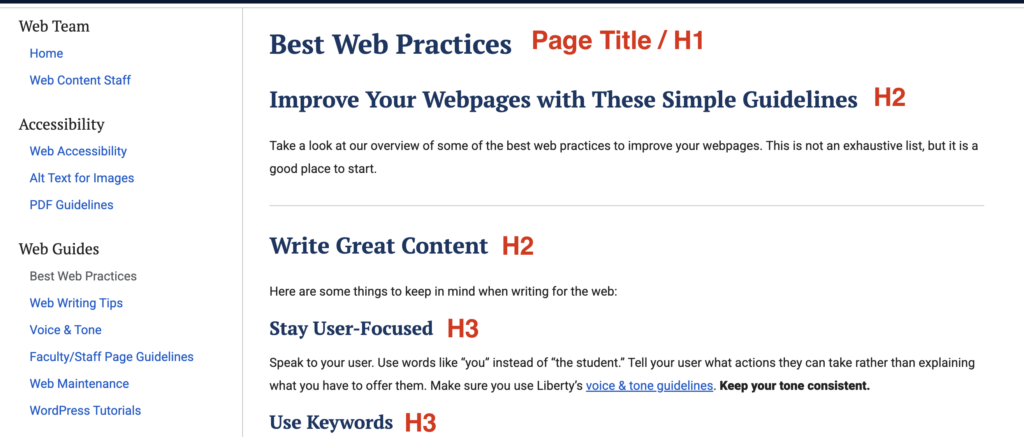
After gathering your keywords, make sure they are represented in your page title and headings. Your page title is usually your heading 1 or H1. There be only one H1 per page.
The H1 title should be a big signpost to help visitors understand what your page is about. It also helps search engines guide visitors to your page when they search for you.
Your other heading levels, such as h2s and h3s, can be used to further organize and subdivide your page content. These headings also contain keywords. Users scan webpages looking for information, so putting keywords in headings and subheadings makes them easy to spot.
Read more tips about making your page titles and headings better.
Keywords in filenames
Before uploading images or PDFs to your webpages, save them with SEO friendly filenames:
- Put the most important keywords at the front of the filename.
- Use hyphens or dashes between words instead of spaces, underscores, or just running words together.
- For PDFs, put revision dates in the document footer or description rather than in the file name.
Keywords in Alt Tags
Put keywords in alternative text or “alt tags” for images. Unfamiliar with alt tags? Review our resource on how to use alt text properly.
Alt tags help visually impaired users who rely on screen readers to tell them about your webpages. The alt tag should describe the image to someone who can’t see it. Your alt tag can help them “see” the image, but it can also help search engines see that the image is related to your keyword.
Keywords in links
For anyone to find your page, including Google and other search engines, you’ll have to add links to it. The link text you use can also help your SEO efforts. Avoid “click here” mystery links. What will visitors find when they click there? Who knows!
Using the right keywords in your link text helps users follow the “information scent” to what they are looking for. For example, the link text for your internship page could say, “Internship Information” and the link to the internship application could say, “Internship Application” or “Apply for an Internship.”
SEO Example
Here’s an example of how we applied these SEO basic principles to the Helms School of Government pages.
Keywords – Potential students are looking for degrees in specific subject areas. They want their education to train them for a career and they may even have one or two specific career paths in mind. The School of Government offers a degree in Criminal Justice with a concentration in Crime Scene Investigation, so we targeted all these keywords:
- Criminal Justice
- Criminal Justice Degrees
- Career in Criminal Justice
We improved the Criminal Justice Degree Program page by using keywords in these places:
Page Title/H1: Criminal Justice Degree Programs
Filename of header photo: Criminal-Justice-Degree-Programs-20141002_0187KM.jpg
Title tag for video iframe: Helms School of Government – Amanda Trent Testimonial
Subheadings:
- Prepare for a Successful Career in Criminal Justice (H2)
- Criminal Justice Degrees (H2)
- Certificate in Criminal Justice (Undergraduate) (H3)
- A.A. in Criminal Justice (H3)
- B.S. in Criminal Justice (H3)
- Minor in Criminal Justice (H3)
- Minor in Homeland Security (H3)
- Certificate in Criminal Justice (Graduate) (H3)
- M.S. in Criminal Justice (H3)
- Ph.D. in Criminal Justice (H3)
Link text: Examples of link text used on the page include “B.S. in Criminal Justice degree” and “Criminal Justice Club.”
We also added a meta description to the page that appears in search results and includes the keywords and lets the users know the page will explain what the degree offers:
Get ready for an exciting career in Criminal Justice. Target your areas of interest in one of Liberty University’s Criminal Justice Degree Programs.
Page Titles And Headers
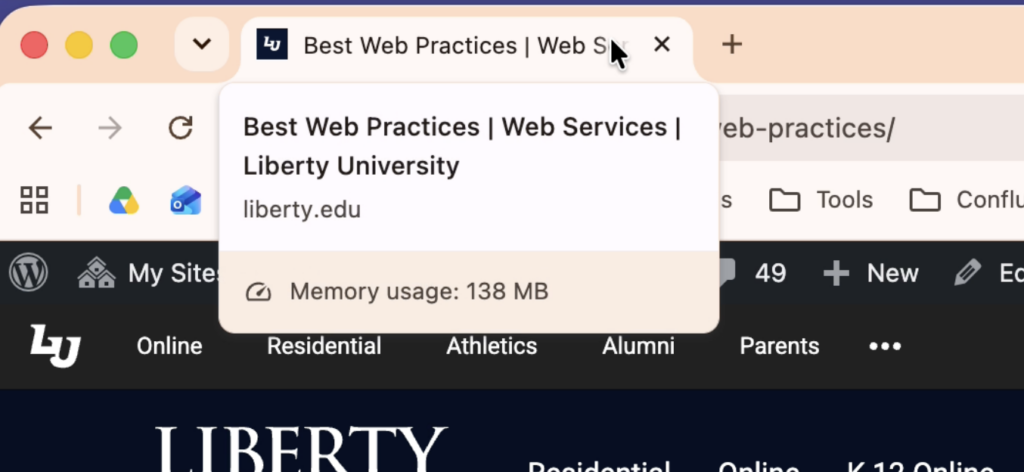
Page titles should briefly and accurately describe the purpose of the page. It should use keywords that your audience will know and understand.
Keep the title short and simple – the full page title will show up to search engines with your Web Department name and “Liberty University” added to it. You can hover over the tab of a live page to see the full SEO title of your page.
Put Keywords at the Beginning
Search engines assume that the most important words are at the beginning of titles and headings. In the above example, the page title appears first, followed by the department name – “Best Web Practices” and “Web Services.”
Heading Levels
These are the heading formats (heading 1, heading 2, or heading 3, etc., also known as h1, h2, and h3) that you use on your page to organize and divide it into sections.
Use one, and only one, H1 per page. Usually, the H1 is the same as your page title and it should go at the top.
Organize your content using headings so that the most important information comes first (h1, followed by h2, etc.) Use headings in descending order and don’t skip heading levels. You can nest headings like you would in an outline, for example, following your H1 you could have:
- First Major Topic (H2)
- Sub-Topic (H3)
- Second Major Topic (H2)
- Sub-Topic (H3)
- Sub-Topic (H3)
- Sub-Topic (H4)
Left-justify headings; don’t center them. People read (scan) web pages using an “F” pattern. When they are scanning the left side of the page, they may miss a heading that is floating in the middle of the page.
Keep headings short and don’t put whole sentences or paragraphs into a heading format. You can emphasize “normal” format text by using bold, italics, or bullets.