Quarterly Workday Insights – November 2025

Our Quarterly Workday Insights newsletter provides information on important topics, including upcoming changes, reminders, and helpful reports. Review each of the sections below to learn more. You can also visit our Workday page any time to stay up to date.
If there are any topics that you would like to have covered, please create a Workday Help case to let us know!
What’s New?
Christmas Carryover Requests (2025)
Full-time staff will receive six days of Christmas time off in 2025:
- Dec. 24–26 (Wednesday–Friday)
- Dec. 29–31 (Monday–Wednesday)
The university will be closed, so most employees are expected to use all six of these days. However, we understand there may be some essential functions needed on campus that will require a small number of employees to work on one or a few days. Please note that unused Christmas time will not automatically carry over into 2026. Employees must request to carry over unused Christmas time.
Read this knowledge article to learn how to submit a carryover request. These requests will route to the Time and Absence approver. If you hold this role, please monitor your Workday inbox for these requests.
Deadline: All requests must be submitted and approved by Jan. 26, 2026.
Carryover days will be available to employees with approved requests on Feb. 2, 2026
Workday Location Updates
To better clarify work location descriptions within Workday, location options have been updated from three to four distinct categories, as follows:
Hybrid: Employee regularly splits time between remote and on-site work on a weekly rotation.
On-Site (remote-capable): Employee can work remotely but only from approved locations on rare or exceptional occasions.
On-Site (not remote-capable): Employee’s position requires full on-site presence; remote work is not an option. Resident state (HR/Payroll address) and on-site location determine taxes.
Remote: Employee performs all work from home or another approved remote location; no regular expectation of on-site presence. The employee is taxed according to their HR/Payroll address only.
Please be aware that if an employee’s HR/Payroll address is outside of Virginia, double taxation could result, depending on whether state reciprocity agreements exist.
HR will work with departments to update existing locations — no action is needed right now. However, when hiring or transferring employees, you will be prompted to select one of these updated options.
New Features in the Relocation Request Form
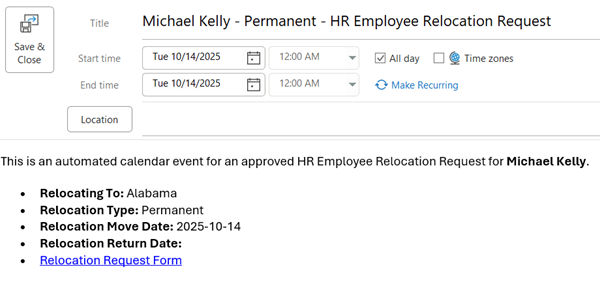
Analytics & Decision Support (ADS) has rolled out new features in the Relocation Request Form to make it easier for managers to understand when a request form has been approved and completely processed.
As a reminder, per 2.12 Workplace Schedule and Location Designation policy, employees considering moving from their designated workplace must seek approval from both their department or school and HR prior to any change of location. This means that employees working remotely and considering changing states or locales must get approval before doing so via the Relocation Request Form.
With these updates, the employee’s manager will now receive an Outlook calendar notification that aligns with the relocation date. This notification is generated when the Relocation Request Form is approved and fully processed. The goal of this feature is to ensure that managers know when these forms are completed and when the moves are happening.
Please review the example below.
Did You Know?
Using Workday Knowledge Articles
Workday knowledge articles went live this summer at the same time as Workday Help. These articles provide quick answers to common questions about benefits, HR policies, and Workday processes like hiring and termination.
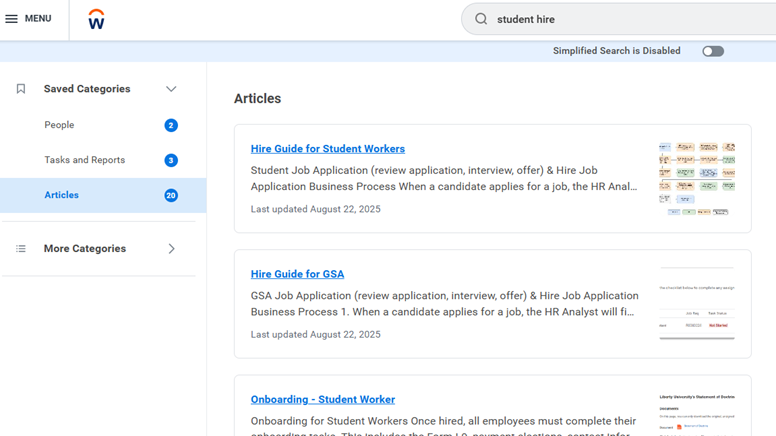
To find a knowledge article, type what you are looking for in the search bar, then click “Articles” for all possible matches.
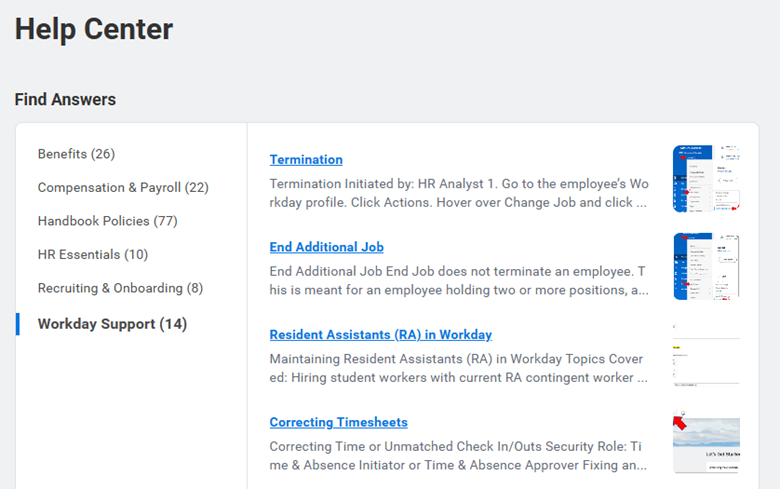
You can also go to the Help Center and view knowledge articles by category.
Below are some popular knowledge articles that employees have found helpful:
- Faculty Compensation Calendar
- Add or Edit Dependents
- I-9 Process Employment Eligibility Verification
- Create a Job Requisition
There are hundreds of articles available, with new ones added regularly. Be sure to explore and bookmark your favorites!
Quick Reminders
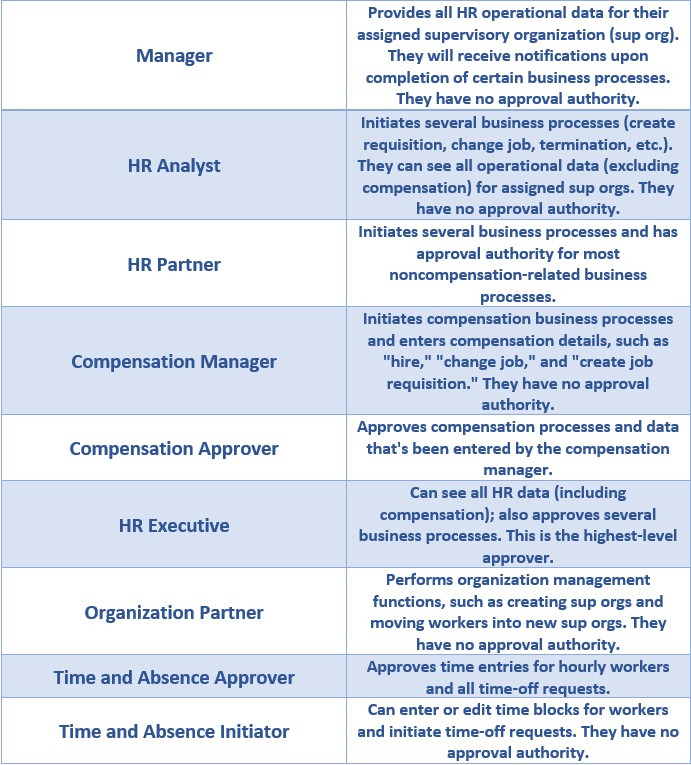
Workday Security Roles
Security roles define what someone can see and do in Workday. We have several security roles that ensure the proper approvals take place and sensitive information is protected. Please review the table below, which lays out the most common security roles and their functions.
Here are some important reminders regarding security roles and permissions tickets.
For example, if you only want Woody to approve Buzz Lightyear’s time, but Buzz works in a sup org with Rex and Bo Peep, Woody has to be given access to approve Buzz’s, Rex’s, and Bo Peep’s time.
Security roles are position-based, not worker-based.
If an employee receives Workday security roles, then leaves from their position, and someone else is hired in their place, that new person will inherit any security roles the previous person was given.
If someone is a Time and Absence approver, they do not need to be a Time and Absence initiator
Time and Absence approvers can perform the same functions as Time and Absence A Time and Absence initiator role should only be given to someone who should not be approving time.
Security roles are based on the sup org.
If someone is given the Time and Absence approver role, they will be able to approve time for every person within that sup org. In other words, we cannot limit permissions to only certain workers within a sup org; permissions will be granted for time approvals for all workers within that sup org.
End of Year PTO Carryover
Employees can carry over up to 40 hours of vacation time into 2026. No action is needed — Workday will automatically carry over these balances. Please note, however, that anything over 40 hours will be forfeited if it is not used in 2025.
All unused holiday and sick time will expire after Dec. 31, 2025. Employees who are required to work during Christmas time-off days (Dec. 24-31) must request Christmas carryover.
Employees can check their paid time-off (PTO) balance for 2025 by following these steps:
Review the remaining time available: the column labeled “Balance As of Date (Includes Events Awaiting Approval)” shows how much time will remain at the end of the year, taking into account any time-off requests that are still pending.
Go to the menu on the top left of the Workday homepage and select “Absence.”
Click “Absence Balance,” enter “12/31/2025” in the “As Of” box, and click “OK.”
Reporting Spotlight
Reporting List Knowledge Article
With thousands of reports in Workday, finding the right one can be tricky. That’s why we’ve created a Reporting List knowledge article featuring 18 of the most commonly used reports.
For each entry, you will find the report’s name, its direct link, and an overview of its content, as well as a note about who can view it.
Topics covered for these reports include: monitoring daily tasks, job changes, time and absence, and recruiting.
Click here to view the Workday reports list.
Looking Ahead
Upcoming Virginia Minimum Wage Updates (Action Required)
The Virginia Department of Labor and Industry has announced an increase in the state minimum wage from $12.41 to $12.77 per hour, effective Jan. 1, 2026.
What this Means for Compensation Managers
For Current Employees: HR will automatically update pay rates for any employees whose wages fall below the new minimum as of Jan. 1, 2026. No action is required from compensation managers for these updates in Workday. However, you are encouraged to communicate these changes to your current staff and student workers who may be impacted.
For Future-dated Transactions (Action Required): For any Workday compensation-related transactions that are future-dated to Jan. 1, 2026 or later, please ensure that the hourly rate is not less than $12.77. This includes job requisitions, new hires, job changes, and any other compensation-related processes.
Your attention to this update will help ensure compliance with state regulations and prevent delays in processing.
If you have any questions, please reach out to HRClassification@Liberty.edu.
Student Workers Terminating Before Christmas Break
As you may know, when a worker is terminated in Workday and their Termination Checklist is submitted, they will lose access to their accounts (including Canvas and Outlook) for 3-4 days while IT removes their employee permissions. Due to the high volume of terminations at this time, the waiting period for access restoration may be longer.
With this in mind, for student workers terminating between December 1 – December 12, we ask that you delay your submission of their Termination in Workday and their Termination Checklist in ServiceNow until after December 12, 2025. This will allow students the opportunity to complete all required coursework without fear of losing account access due to their termination.
After December 12, 2025, please:
- Submit your student worker’s termination with the effective date being their last day of work. This will maintain data integrity for their termination date.
- Submit their Termination Checklist to ServiceNow if one is needed.
Please note, any involuntary terminations will be processed normally, at the time of termination.
If you have already submitted a Student Worker termination and need it canceled to resubmit after December 12, 2025, please create a Workday Help case.
Please to Workday knowledge articles for help processing terminations, and handling any student worker terminations for RA’s in Workday.
Past Quarterly Workday Insights can be viewed here: