Campus Security Authority (CSA) Reporting Guidelines
Timely and accurate reporting helps keep our campus community safe and ensures Liberty University remains compliant with the Clery Act. Campus Security Authorities have a responsibility to support Liberty University students and serve as mandated reporters. Each CSA must know how to find and properly submit an Incident Report.
This page details the steps you will need to take when you file your report. You can also open and follow the process as explained in the PDF walkthrough. And, as always, you can reach out to clery@liberty.edu if you have any additional questions.
How to File a Report
The report is laid out in four sections. Please complete all sections to the best of your knowledge. Several sections are required. Submit this report swiftly and without delay after reportable information is disclosed to you.
- It’s important to be detailed and fill in as much information as possible. Use the designated space provided to capture as many details as you can.
- Details such as your name and contact information will be asked of you. You must fill out the exact date and location of the incident.
- For the “Location of incident” section, indicate the location where the incident took place, not where the disclosure was made.
- For the “Specific location” section, provide the specific room number or floor where the incident took place. You may also indicate whether the incident occurred inside or outside the location.
Complete each section to the best of your knowledge, including reporter information, everyone involved, the applicable Clery crime, and a detailed narrative. Always listen with as few interruptions as possible. Allow the person to explain what happened in their own words, and avoid asking leading questions or suggesting answers
Provide Important Details
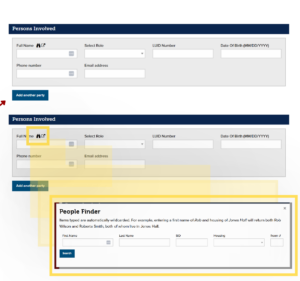
Use this section to list all individuals – that is, witnesses, victims, and offenders. You can select the “Add Another Party” button to add as many individuals as were part of the event.
Select the binoculars button to use the People Finder feature to search for individuals who are affiliated with Liberty University. If the individual is not affiliated with the university, provide as much information as you can about the individual.
For the “Nature” section, select the applicable Clery crime that was disclosed to you. If you struggle to determine the applicable Clery crime, visit the Office of Clery Act Oversight and select Clery Act Definitions (PDF) under the Clery Resources section.
In the narrative section, fill out the space provided with as many details as you can gather. Avoid using words like uncomfortable, scared, or fearful without further explaining what that means. For example, “The reporting party stated that she was afraid because the responding party had threatened to physically harm her.”
Attach any supporting documentation, such as photos, screenshots, text messages, or videos. When the form is complete, select “Submit”; remember, you may choose to receive an emailed copy and will receive a confirmation number after submission.

Remember! You should always include:
- A detailed description of the incident
- The date and time the incident occurred
- The date and time the incident was reported to the CSA
- The exact location of the incident
- All parties involved, if known

- Use open-ended questions, such as “Can you tell me what happened?” or “Where did this occur” or “When did this happen?”
- Do not promise confidentiality. You should explain that you are a CSA and you will have to make a report based on what was shared with you.
- Remain neutral; your role is to support and document
Need Some Additional Help?

Contact LUPD Non-Emergency at (434) 592-7641